Maintenance |
  
|
Maintenance |
|
This area is for the maintenance of your database.
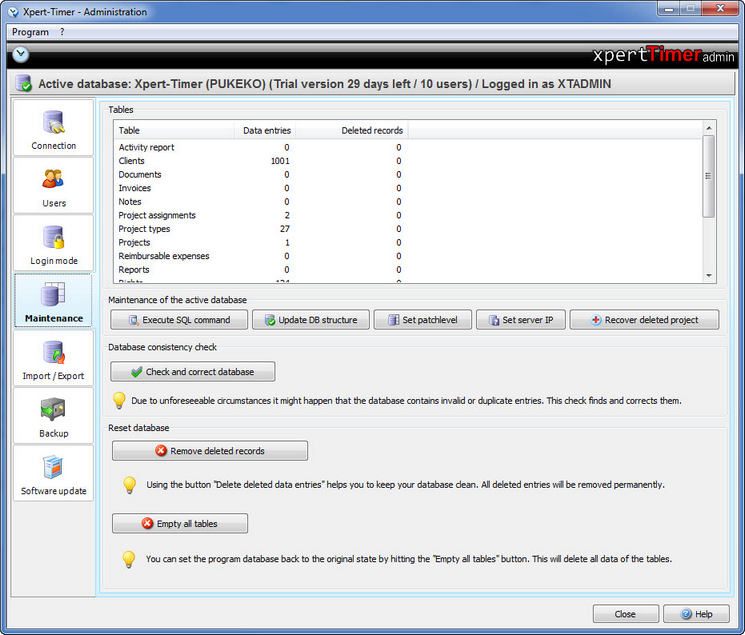
Execute SQL command |
You can submit SQL commands through XTAdmin. If you click on the button a dialog will open, where you can enter your SQL query. Usually you should not have to use this button. |
Update DB structure |
The database structure is updated on some software updates. This button is only used if you experience problems while updating. Please contact our service in case you run into problems. |
Set patchlevel |
Please do not use this button by yourself. The database patchlevel is set automatically. Only if there's problems with a database update you should use this button. Make sure you contact our service department first. |
Set server IP |
Set the server IP if you experience connection problems. Xpert-Timer will then ping the server every couple of seconds and you'll receive a message once the server connection is lost. If the IP is not set, you'll get a database error instead. |
Recover deleted project |
In case you've deleted project by accident, you can restore them here. |
|
|
Reset database |
You can delete deleted entries in the database here. When you delete for example a timestamp in your Xpert-Timer, there's a flag "deleted" set in the database, but the timestamp is still there. Only if you use this button, all deletes entries will be completely removed. |
Empty all tables |
With this button all your data is deleted. |